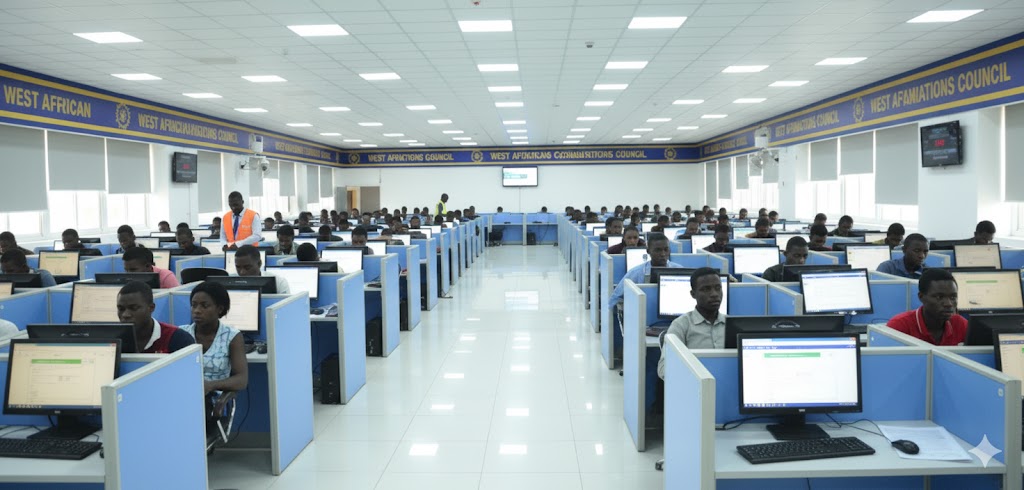

Preparing students for the WAEC transition to Computer-Based Testing (CBT) requires more than subject knowledge; it necessitates practical computer skills, effective exam-taking strategies for on-screen tests, and repeated exposure to the CBT interface. This guide gives teachers, school managers, and tutors a step-by-step training plan, classroom activities, resources, and ready-to-use checklists. Hence, your students walk into the exam centre confident and prepared.
Why this matters
WAEC has been steadily implementing CBT for objective papers and expanding its use across WASSCE formats; schools and candidates must therefore be ready for a hybrid/future full CBT environment. Official WAEC CBT resources and mock platforms are available for practice. (mockcbt.waec.org.ng)
Overview: What to teach (learning goals)
Primary objectives for each student
- Confidently operate a computer: start/shut down, use mouse & keyboard, open apps.
- Navigate CBT software: answer, review, flag, move between questions, submit.
- Read and interpret on-screen questions quickly and accurately.
- Apply time-management techniques for multiple-choice objective papers.
- Maintain exam discipline (file saving not usually needed for CBT, but general exam etiquette applies).
Understand the WAEC CBT format (teacher brief)
- WAEC’s CBT rollout targets objective (multiple-choice) papers first; other papers remain hybrid in many subjects. That means students must be excellent at on-screen MCQs and familiar with how WAEC presents questions online.
- Ensure you check the specific subject syllabus and WAEC timetable for the year of sitting. WAEC posts timetables and candidate instructions on official portals.
Training Program (6–8 weeks, scalable)
Week 0 — Setup & baseline
- Inventory: Ensure physical access to computers/tablets (ratio ideally ≤ 1:4).
- Baseline test: Short practical to measure each student’s basic computer skills (mouse, typing speed, navigating menus).
- Account setup: Create practice accounts on mock CBT platforms (see Resources).
Weeks 1–2 — Basic computer literacy & CBT navigation
- Teach parts of the computer, starting & shutting down, logging in.
- Mouse skills: single click, double click, right click, drag & drop, scrolling.
- Keyboard basics: alphas, numerics, Enter, Backspace, Tab, arrow keys.
- Intro CBT walkthrough: how to answer, flag, review, and submit answers on the exam UI. Use the WAEC mock CBT player for demonstrations. (mockcbt.waec.org.ng)
Weeks 3–4 — Exam skills + subject practice
- Timed practice sessions: 30–60 minute objective tests under exam rules. Gradually increase difficulty and time pressure.
- Teach reading strategies: read the question stem first, eliminate wrong options, and avoid jumping to the options immediately if it wastes time.
- Emphasise accuracy before speed — then introduce timed targets.
Week 5 — Full-length mock exams & analysis
- Run full CBT mock papers under strict exam conditions (silence, timed, no phones).
- After each mock, review common mistakes, question types that took long, and individual student reports.
Week 6 — Final polish & exam readiness
- One-on-one remediation for slow/weak candidates.
- Familiarisation day: practice at the actual exam centre if possible or on identical hardware.
- Checklists, exam day routines, and stress-management quick sessions.
Classroom Activities & Practical Drills
1. CBT Interface Drills
- Use WAEC’s mock CBT player for group demos and individual practice. (mockcbt.waec.org.ng)
- Drill tasks: flag/unflag questions, move backward/forward, change answers, and submit.
2. Mouse Accuracy Game (10–15 mins)
- Use simple online aim/click or drag games to build precision (no flashy distractions — simple target practice).
3. Typing & Speed Practice (15–20 mins)
- Use TypingTest.com, RapidTyping, or local typing apps. Track WPM and accuracy; aim for comfortable 20–30 WPM with ≥90% accuracy for exam-readers.
4. Timed Objective Quizzes
- Create short 20–30 question quizzes in Google Forms or a CBT mock system; set a strict time limit and review performance analytics.
5. Error Analysis Workshops
- After mock tests, group students to review missed questions, identify patterns (careless errors, misreading, timeouts), and develop personalized fixes.
Resources & Platforms (practice & mocks)
- WAEC e-Testing Mock/Player — official practice environment. Use it as the primary familiarisation tool. (mockcbt.waec.org.ng)
- WAEC Registration & Timetable pages — for official instructions, candidate notices, allowed devices and timetable checks. (registration.waecdirect.org)
- Exam guidance & CBT tips — teaching articles and guides that explain CBT navigation and time management. Use them for lesson planning and student handouts. (ulesson.com)
- Local edtech mock providers — uLesson, eStudy, and other exam prep apps provide timed mock tests and analytics. (Choose reputable platforms and verify content quality.) (estudy.ng)
Lesson Plan Template (single 40-minute practical session)
- Warm-up (5 min): Quick recap of CBT controls.
- Demonstration (5 min): Teacher runs through 5 sample MCQs on CBT UI.
- Practice (20 min): Students take a 15–20 question timed MCQ test.
- Review (8 min): Show class performance highlights and top 3 mistakes.
- Homework (2 min): Short typing or CBT drill to practice at home.
Teaching Tips & Best Practices
- Start slow, build speed: Begin with accuracy drills; once accuracy ≥90%, introduce stricter time targets.
- Simulate exam conditions: Silence, timing, and single-device usage reduce exam-day surprises.
- Teach test-taking strategies: Skipping and flagging hard questions, eliminating distractors, and allocating time per section.
- Use analytics: Many mock platforms deliver per-student metrics — track improvement and design interventions.
- Accommodate less-privileged students: Offer supervised practice sessions after school; rotate access to hardware so everyone gets direct practice time.
Common Student Mistakes (and how to fix them)
- Misreading stems — Train students to underline the key phrase before viewing options.
- Rushing to options — Teach them to predict answer mentally first then confirm.
- Poor time management — Practice sectional timing; teach when to skip and return.
- Technical panic — Reassure students, teach them to raise hand and follow invigilator instructions; have mock technical disruption drills so they know protocol.
- Frequent accidental clicks — Mouse/trackpad drills and encouraging the use of “Review/Flag” function rather than changing answers in haste.
Exam Day Checklist (student handout)
- Arrive early, with valid ID as required by WAEC. (registration.waecdirect.org)
- Ensure charged device (if allowed) or know the exam centre hardware.
- Eat a light meal; bring water (if permitted) and wear comfortable clothes.
- Read instructions carefully on the screen before starting.
- Use the flagging feature for doubtful questions; don’t leave the screen without saving/confirming submission.
- If technical problems occur, notify the invigilator immediately — DO NOT tamper with the machine.
Assessment & Certification of Readiness
- Use progressive benchmarks: baseline → after 2 weeks → after 4 weeks → final mock.
- Define passing criteria for readiness: e.g., average mock score ≥70% and CBT navigation tasks completed without help in ≤5 minutes.
- Issue a “CBT Ready” certificate to students who pass the final mock — boosts confidence and provides proof for school records.
Sample Communication to Parents (short template)
Dear Parent,
We are implementing a 6-week WAEC CBT readiness program that covers basic computer skills, CBT interface mastery, timed mock tests, and exam-day protocols. Please encourage your child to attend after-school practice sessions and limit distractions during home practice. — School Admin
Quick Starter Checklist for Teachers
- Book a computer lab for 6–8 weeks.
- Register class on the WAEC mock CBT player and a reputable mock provider. (mockcbt.waec.org.ng)
- Create weekly lesson plans and timed mock schedules.
- Track students’ typing speeds and CBT navigation fluency.
- Run 2 full exam-condition mock tests before the real WAEC CBT.
Click here for Downloadable 6-Week Lesson Plan (Daily Activities) for WAEC CBT Training